Sunday, 18 February 2018

Packaging and Deploying Oracle Java runtime in SCCM 2007


Having trouble packaging Oracle Java in SCCM? Can't find the MSI? Once you installed Java you still have the old version as well? Today I'll explain how I to successfully deploy Oracle Java while removing older versions and be able to keep your estate to a standardized version.


1.    Visit http://www.java.com/en/download/ for the latest Java version
2.    Click “All Java Downloads”


3.    Select the “Windows Offline” version.


4.    Right click on the program and click “Run as administrator”, enter your EA credentials

5.    When the Java Welcome Screen appears don’t do anything, leave this open but don’t click “install”.


6.    Browse to the following location. Replace with your own username.

C:\Users\%username%AppData\LocalLow\Sun\Java\

In this folder you will find a subfolder with the MSI version you are attempting to install. Copy this folder to your desktop. You can now click “cancel” on the open installer.

7.    Copy the the files to the source location you use for deployment and give it a relevant name.


8.    Open up the MSI in your favourite MSI editor. In this example I'm using InstEd and click on “Transform” > New Transform. Give the Transform file a suitable name containing the product and version it’s intended for


9.    Make any modifications required to the MSI transform.

In the case of Oracle Java, we simply must disable Automatic updates via “AUTOUPDATECHECK” on the Property table. But there are other common checks you should perform such as ProductLanguage must always be 1033 (English), AllUsers should be set to 1 (this specifies a per machine context). Always ensure to create a new Transform file for each new version.


10.    Click “File” and Save, press OK when prompted.


10. In the SCCM Console, browse to software distribution > Packages and right click and choose New > Package from definition.


11.    Click next, Browse and then browse to the location of the extracted MSI, select the MSI.


12.    The Wizard will now show the product and version number, ensure this is correct and then click next. It’s important to check that this information is correct as this has the potential to replace a previous piece of software in the database. There have been several occasions where the version number clashes with a previous one. In this case you can contact the vendor and ask them to supply a changed version, or you can alter the version number for yourself in Instead (property table).


13.    Select “Always obtain files from the source directory” and click Next.
14    Click Next


15.    Click Finish


16.    Expand the new package on the left-hand pane and click on “distribution points”


17.    On the right-hand pane click “New Distribution points” and the click next on the wizard once it appears.

18.    Select the the relevant distribution point and click next. Note you will want to distribute the package to all distribution points once testing is completed. Do not copy the package to any shares marked SMSPXEIMAGES$ 


19.    Click “Close”

20.    On the left-hand pane right-click on “Programs” and select New > Program.


21.    Enter the Program name “Install Vendor, Product, Version”

eg: Install Oracle Java 8 Update 8.0.40.

22.    Enter the installation string under “Command Line”

eg: msiexec /i jre1.8.0_40.msi TRANSFORMS=Oracle_Java_RT_8040_AA.mst /qn

Click Next.


23.    Select the platform the program can be run on. Click Next.


24.    Select “Whether or not a user is logged on” and click next.


25.   In my organisation I'll be using the program for OSD and completely silent installation. I'll choose “Suppress Program Notifications” and “Allow this program to be installed from the install software task sequence without being advertised”.


26.    Select “import” and choose the installer you used, this will the import the product GUID and enable MSI source management. Record this GUID, we will use it later. Click Next.


27.    Click Next and on the review all details page click next again.

28.    Check the program creation was successful (indicated by green ticks) then click Close.


29.    We will now create a new Program to remove this version of Java, the steps for this are essentially the same as those for the first program. This time, we will use the program GUID that we recorded earlier to remove the software; this will ensure that only this unique version will be removed.

 **Important** do not enable MSI source management for the removal job.

eg: the full uninstall sting is msiexec /x {26A24AE4-039D-4CA4-87B4-2F83218025F0} /qn


30.    Right click on collections and create a “New Collection” and fill in the name of the collection name, click Next.


31.    Click Next 


32.    Press “OK” when prompted with "the collection has no membership rules" we will resolve this later. Click next, then Finish.


33.   The newly created collection will then show in the left-hand pane. We will now create a sub-collection within this collection for the pilot group. Essentially the process is a repeat of the above steps with the collection name changed. When you have done this you will have a collection within a collection similar to below.


34. We will now generate a report of all versions of Java within the estate so we know which version we need to remove.  On the left-hand pane click “Asset Intelligence” > “Asset Intelligence Reports”. On the reading pane beside “Look for” enter Search for installed software”.


35.    Right Click the report and choose “run”

36.    When the report appears select “values” and select the SMS00001 collection (all systems). Enter %Java% in the “Enter a part of the product name” field and then click “Display”

37.    The report produced will show all known Java versions in the estate, we are interested in the “Software ID” field, these GUIDS will be used these to ensure that all previous versions are removed from a system before installing the new version. Keep this report open.

**Important** Programs other than the one you are searching for may appear


38.    Open the location you stored your Java MSI and create a new text document in notepad, save as“Oracle_Java_Removal.cmd” file and reopen this up with notepad.

The .cmd should start with the following tasks to close open browsers and kill relevant processes that may stop the uninstall from being successful.

@ECHO OFF
REM Close all open web browsers
:killfirefox
taskkill /f /t /im firefox.exe
tasklist /FI "IMAGENAME eq firefox.exe" 2>NUL | find /I /N "firefox.exe">NUL
if "%ERRORLEVEL%"=="0" GOTO killfirefox
:killiexplore
taskkill /f /t /im iexplore.exe
tasklist /FI "IMAGENAME eq iexplore.exe" 2>NUL | find /I /N "iexplore.exe">NUL
if "%ERRORLEVEL%"=="0" GOTO killiexplore
:killchrome
taskkill /f /t /im chrome.exe
tasklist /FI "IMAGENAME eq chrome.exe" 2>NUL | find /I /N "chrome.exe">NUL
if "%ERRORLEVEL%"=="0" GOTO killchrome
REM Close all JAVA Background Processes
:killjusched
taskkill /f /t /im jusched.exe
tasklist /FI "IMAGENAME eq jusched.exe" 2>NUL | find /I /N "jusched.exe">NUL
if "%ERRORLEVEL%"=="0" GOTO killjusched
:killjucheck
taskkill /f /t /im jucheck.exe
tasklist /FI "IMAGENAME eq jucheck.exe" 2>NUL | find /I /N "jucheck.exe">NUL
if "%ERRORLEVEL%"=="0" GOTO killjucheck
:killjqs
taskkill /f /t /im jqs.exe
tasklist /FI "IMAGENAME eq jqs.exe" 2>NUL | find /I /N "jqs.exe">NUL
if "%ERRORLEVEL%"=="0" GOTO killjqs

 Next  add your GUIDS from the report line by line in this format.

msiexec.exe /qn /norestart /x {B048D821-636D-43D9-82EC-8B0010734231} 
msiexec.exe /qn /norestart /x {726880D7-98DE-41CC-B553-E6084260CFB7} 
msiexec.exe /qn /norestart /x {0C933B8C-1154-4EC8-8832-55CEAACA3B13} 
msiexec.exe /qn /norestart /x {3076929A-FB47-4CB7-A8FF-72CB95C22F95}

End the script with 

exit /B %EXIT_CODE%

Ensure to save the script.

**IMPORTANT** you should also INCLUDE the GUID of the latest version you are deploying. This will ensure that any installations of that version on the estate are the managed version you have distributed from SCCM.


 39.    Now open the SCCM console and browse to “Software distribution” > Packages and find your Java package. Click “Update distribution points” on the right-hand pane. When prompted by the “Confirm Update distribution points” box click “Yes”


40.    In the SCCM Console browse to “Operating System Deployment” > Task Sequences >Create a new "basic task sequence called "Install Oracle Java Versionname". 

41.    Right Click on the newly duplicated task sequence and click “properties”

42.    In the “Name” field, update it to the include the include the product and  latest version you are deploying. Press “Apply” when finished.


43.    Back to the main console window, right click on the newly renamed task sequence and choose “edit”

44.    Create a new group at the top level with the version being deployed. inside this add a "remove all oracle java" step as a "run command line". Ensure to set the package to the Java package you created earlier. I've also set the "continue on error" option for this in case there is an unknown exit code returned.


45.    Add a "delay step as step 2" this is just a "run command line" step with the command set to ping a loopback address for approx 20 seconds.


46.    Lastly add a "install program" step and add the program we created earlier, ensure the "install" program is selected.


47.    Right click on the newly created Task Sequence and then click “advertise”.

48.    Click “Browse” beside collection: and then select the “Pilot” collection you created earlier. Click OK.


49.    Click Next


50.    Click the “Sun” button beside “Mandatory assignments” and select “Immediately after this event” and “As soon as possible” from the drop-down menu, click OK.


51. Select “High” priority, and “Always rerun program” and click next.


52.     Select “download all contents locally before starting task sequence”, “when no local distribution point is available, use a remote distribution point” and “when no protected distribution point is available, use an unprotected distribution point”. Click Next.


53.    Click next three times and finally click close.


The pilot application is now ready for deployment testing. You can now add clients directly into the pilot collection, any previous versions of Java will be removed before installing the new version. 

When you are satisfied that your deployment works and removes all previous versions you should the create a new collection for rollout set it to refresh every day, use a query based collection to search for all systems with Java installed not at the same version you want to deploy (example below)

Exclusions for systems can also be added as below.


When this collection becomes empty, the deployment will have been successful to the estate.

You can keep track of the systems you've upgraded by using another collection with query containing the version you are deploying. (as below)


When you run the job all versions will be replaced with this new version. You can keep your estate at this version by adding any newly released versions GUIDS to the removal script, or upgrade to a newer version by simply replacing the package with the new version.

I appreciate this is a long post, if you've stuck with me this far, thanks for that. As always feedback is appreciated by way of the comments section, also feel free to give me a +1 to help the search ranking of this page. Many thanks.


Friday, 16 February 2018

HP Wireless Button Driver - How to Get that MSI!


Here's how to extract the MSI for the "Wireless Button driver" for use in MDT/SCCM sequence.


  1. Download the softpack direct from HP's website. In the example here I'm using SP77524 from the Elitebook 820 G3.

  1. Open an elevated command prompt and at the directory you stored the file and type "setup.exe /a"


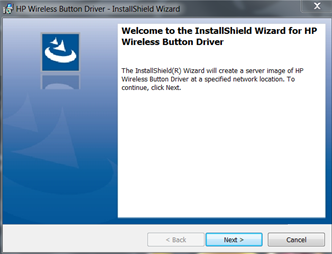
You will see a wizard appear. Don't click anything on this, leave it open.


  1. In file explorer browse to the "c:\users\%yourusername%\Appdata\local\temp folder.

Order the files and folders by date modified. You will see one at the time you ran the installer, open this folder and inside will be the required MSI along with other required installation files.


You can now take the contents of this folder and add to a deployment package. A silent installation can by performed by running msiexec /I "HP Wireless Button Driver.msi" /qn TRANSFORMS=1033.MST 

If this helps you please don't forget to leave me a +1. Many thanks

Tuesday, 27 October 2015

Retro Rig 1999 - 2001 AMD Athlon 3DFX Voodoo 5 5500 Build

Nostalgia Gone Wild


Previously I worked on a 1998-1999 build and highlighted a few areas where I thought upgrades would be advantageous in certain games. Instead of keeping one single retro-rig and modifying it as required I've decided to build an entirely different system.

Again, I've been reusing some older parts I already have available and throwing in a few newer parts that won't affect the performance of the build such as case, psu, fans etc. The spec will be equivalent to that I had "back in the day" to play games of this time-period.

Original spec was:

AMD Athlon 650Mhz
FIC SD11
256mb PC 100 (originally 128MB upgraded)
Geforce 256 DDR 32MB / 3Dfx Vooodoo 5500 AGP
Soundblaster Live 1024
17GB 5400 RPM HDD  
Iomega Zip 100
4X CDRW
48X CDROM
Suntek Viper case
Suntek 250Watt PSU

Some would question whether or not a Voodoo 5500 was really an upgrade to a Geforce 256 DDR. It wasn't really from a technical viewpoint, but at the time VIA based boards were pretty unstable when used in combination with Geforce 256. This quickly became apparent to me after purchase. After spending months waiting for the 3DFX "Rampage" I choose to go with the Voodoo 5500 upon release as my Unreal Tournament playing career was suffering as a result of constant game-play stutters and crashes thanks to a combination of the Unreal engine's poor Direct3D support and the SD11 board's ability to supply enough voltage via the AGP slot. The choice came down to what games I was playing at the time, and at that time Unreal Tournament was king.

Although I still own FIC SD11 board I'm opting to exchange it for an Asus board (not had a bad experience with Asus boards yet!) It cost me a whole £5 on eBay and came with a few extra cards I won't be using.

Apart from the motherboard and case, I already have all other required parts. The K380 case cost me £23 from ebuyer.com with free next day delivery - can't really beat that. 

One part I considered using was my Promise Ultra 133 TX2, but this is where the annoyances started. The card requires a floppy disk to install prior to operating system installation, unfortunately the Asus K7V was about to give me my first negative Asus motherboard experience as it turns out the floppy disk controllers on these boards are prone to failure. Guess what, mine had failed. I tried everything I could think of including flashing the board bios, tried several FDD's but still could not get it to work, defeated for the moment I've decided to got without the Ultra TX2, but may revisit in the future.

My new spec is:

AMD Athlon 750Mhz
Asus K7V
768MB PC 133 (running in PC100 speeds due to chipset)
3DFX Voodoo 5500 AGP
Soundblaster Live 1024
80GB 7200 RPM HDD
Intel Pro 1000GT Ethernet card
DVD-ROM
CoolerMaster K380 Case
Maplin "G7 Power Extreme 680W" (Which is more like 400watt PSU in reality)


Voodoo 5, Awaken from your slumber and unleash hell upon this world once again.


The gubbins inside the system - Again, I know - those cables!


A nice little system.

One issue I found was despite the new chassis with 2x 120mm fans the system is still quite loud. It turned out to be the combination of the Voodoo 5500 card and the Slot A cooler fan. I will need to get replacements as soon as possible.


Windows 98SE installed and ready to run


Game Performance


Medal of Honour: Allied assault 

This game was like a warning sign for me back in the day that my Voodoo 5500 wasn't going to last very long. While the Voodoo is perfectly able to play these games from a performance point of view, the driver support was just about dropped by this point. Little errors started to creep into games, such as the texture misalignment in MOH:AA in-game menus. Lighting looked a bit weird at times but overall the game was still playable.


Menu misalignment

Strange lighting on moving objects.

Yet some scenes are perfectly fine.

Hitman: Agent 47

Hitman wasn't really a game I ever got into on the PC. I remember playing it on the original Xbox and thought it was alright, but it just didn't seem like a PC game to me at the time. All the same, it seems to run quite well on this little system.

In Glide mode many of the advanced options are grayed out and we're restricted to 16-bit colour

Yet Direct3D offers much more

Woke up in a padded cell chained to my bed - what did I do last night?

Direct 3D may be sharper and more colorful, but it has a horrible bilinear filtered look is more obvious.


Emperor : Battle for Dune

This was a big-time favourite of mine back in the day. Me and a friend played this, along with Red Alert 2, Unreal Tournament for months on my first ever constructed home LAN.

The game runs well on Voodoo 5500, except you must remember to choose 32-bit colour, or things get really weird looking. I've never had this confirmed by anyone, but I'm sure that this game allows use of the advanced motion blur or T-Buffer effects when used with a Voodoo 5500.

So excited to see this again.

16-bit more offers graphical corruption

Fixed by 32-bit mode.
Imperium Galactica 2

Another game I wanted so bad to like was Imperium Galactica 2, I could see the potential, but it's way overly complicated, and impossibly difficult against CPU in skirmish mode. I played this with a friend on the LAN and it was a little more fun to gang up on the CPU, but the game was plagued with "Synchronization error" problems.


This game didn't offer display modes above 640x480 until a patch was installed, be warned!

A really neat concept for a game, but it's just impossibly hard to play.

The Rest

The others I've played on this system include the Quake 3 engine driven Startrek Elite Force, Halflife, the original Aliens Vs Predator game and Unreal/UT. All in all, the performance is good and what you would expect for a high-end card of this time.


Rambling is over for now, if you enjoyed the post please remember to give me a +1 or leave a comment. Thanks!


Friday, 23 October 2015

A Blast from the past - Unreal Forgotten Video Playthrough

Things Just got Unreal


I've been meaning to post this for a good while now but as you can imagine it's been pretty low priority in the grand scheme of things. It's only now with me having injured by back that I'm forced to take some time off work and take it easy that I've found myself once again playing games. Oddly to most people, it's not the latest and greatest games that take my fancy, but the older titles for obsolete systems that I once again find myself drawn towards. This potentially isn't a healthy thing for me, given that I once had a massive games collector habit that to this day still fills my attic (and my wife's head with dread), It's a collection that's legacy spawned a community that still stands in the now passed-on website sega8bit.com. 

I've enjoyed PC gaming since I got my first proper PC in 1998, as soon as I got that 3DFX Voodoo 2 I immediately understood how far ahead the PC was in the graphics department compared to the gaming consoles of the time (PlayStation and Nintendo 64). Unreal was one of the first titles I purchased that I felt properly harnessed the potential of that 3DFX hardware. It was also the first time I ever witnessed a fully 3D world with outdoor scenes featuring distant mountainous terrain, running water and a sense of being on an adventure in an alien landscape. 

After spending months playing Unreal in single player mode I finally delved into the world of online gaming where again my mind was blown by what seemed like an infinitely expandable universe as it was possible to download thousands of player-made levels easily and quickly for the first time. It was only a matter of time before I too would create my own levels and contribute something back to this community. 

My initial attempts were poor to say the least, a couple of box rooms joined up to each-other, but over the next few years as Unreal Tournament came out I continued to tinker with the editor and released with quite a few multiplayer levels (see Sinistral's Unreal). I don't know when it quite happened, but some time in 1999 I decided I wanted to make a single player pack, Work was progressing well up until at least December 2002 and then college and work and life in general got my attention. I would be years later (2009) before I resumed work on the pack and finally released it to the (by then severely diminished) Unreal community. The map pack was quite literally forgotten about, hence the title for my pack was found. Unreal: Forgotten is a result.

Here's the low-down on Unreal: Forgotten

"Forgotten is a Map pack created by Andrew "Sinistral" Allison for the original Unreal. It uses some of the features of the unofficial Unreal 227 patch which can be found at Oldunreal.comForgotten consists of six new levels, plus two new cut-scenes."

 Titles and order are as follows:


  • Intromap - And So It Begins
  • The Abandoned Village
  • The Old Mining Colony
  • The Krall Castle
  • The Massacre of Outpost One
  • Earth Under Attack
  • The Skaarj Supreme Command Cruiser
  • Extromap - The End


Intromap: And So it Begins


A brief mini-movie to set the scene, the engine was very limiting from in this respect.


The Abandoned Village


The first playable level sets the scene on the snowy northern hemisphere of NaPali, a part that isn't seen in the original game. 


The Old Mining Colony


This will be pretty familiar to anyone that's played the original Unreal, the level oozes classic Unreal mining level atmosphere, but there's a few surprises in there.


The Krall Castle


A very long level that started out as an experiment of clobbering together a few different pieces I was working on, the result is (what I think) is a pretty epic scale Unreal map.


The Massacre of Outpost One


Explore a human base on NaPali, there's more than a little bit of Stargate SG1 influence in there.


Earth Under Attack


Another Human level set on Earth during a Skaarj invasion. 


The Skaarj Supreme Command Cruiser (includes Extromap- The end)


The final battle takes place on the Skaarj command cruiser where you must face the Skaarj Queen.


Unreal Forgotten can be downloaded at the Unreal Forgotten homepage.

As always, sharing is caring. Don't forget to leave a comment or give me a +1 if you enjoyed this post! Thanks!


Sunday, 14 June 2015

1998 - 1999 Retro PC Build - When Nostalgia Gets The Better of Me.

I've always enjoyed building my own machines, it's not something I get to do much these days as I don't buy anywhere near as much new equipment as I used to. For anyone that knows me, gaming is a bit of a hobby that got out of hand when I was a young singleton with too much time on my hands. A collection habit started slowly, I started buying a lot of older games and consoles that I either owned as a kid, wanted as a kid or just wanted to try. Before I knew it I was sitting with a room full of old games and consoles, most of which in all honesty I'll probably never play. Collecting consoles is easy, you buy a console and some games and as long as you look after them they'll always play in the same way as you remember them.

PC gaming has always been a bit different for me though, with the PC there was always a "next big game" coming along that would require new hardware to run at maximum settings. This resulted in far too many upgrades over the years, sometimes it would be a simple upgrade of a graphics card, other times it would be full motherboard, CPU, memory, power supply etc, sometimes issues were software created in that a newer operating system had lost certain features that the older game required. The problem with this is that when you upgrade specifically for the purpose of playing a newer generation of games, you immediately lose compatibility with the previous generations. It's only now looking back that I can see so many games I used to love playing sitting in boxes in my attic that I will never play again, simply because I no longer have the hardware required to play them. Something must be done about this situation!

I still have a lot of older spare PC parts kicking around doing nothing in my garage, but no complete systems. My idea is to build a new "old" PC capable of playing these older titles using these bits and what I can find on eBay or in the wild. I'll aim to keep the internals of the systems to a specific time-frame, but won't limit myself to newer cases, fans, heatsinks or any part that may reduce negative factors of using parts of this era (such as heat, noise and energy efficiency) that have no performance or compatibility impact. The aim is not to build the "ultimate" machine from a specific time-frame, just a spec that would be broadly compatible with the games I played back in that time-frame. The idea ready, now all I need to decide is where to begin.

Specing and Part Selection

The earliest "good" PC I owned and actually played games on was back in 1994, a laptop computer with a 486DX2 66mhz CPU and monochrome screen. This was pretty much used to play old DOS games back in the day such Monkey Island and Civilization. I don't think I want to start there. Fast forward to 1998 is when I ordered parts for my first (then considered mid-range) "Custom PC". Here's the original spec.

AMD K62 350 Mhz
First International Computers VA503+  Super Socket 7 Motherboard (AT)
128MB PC 100
Jetway Wonder 4000 (S3 Savage 3D 8MB)
Skywell Magic 3D II (3DFX Voodoo 2 12MB)
Creative Soundblaster AWE64
Iomega Zipdrive
Floppy
Creative 36X CD-ROM
6.5GB Seagate HDD
Generic Whitebox AT Minitower
15" Generic Monitor
Generic 3 button comm port mouse
Generic AT keyboard

A build covering the 1998-1999 "era" would be a great place to start. At the time this great little PC opened up a whole new world of PC games for me and introduced me to hardware 3D acceleration. I remember great titles I instantly fell in love with such as Unreal, Unreal Tournament, HalfLife, Kingpin, Ultima Online, Civilization 2, Blade Runner, Red Alert 2 and many, many more that I've probably forgotten about that I'm soon to re-discover. This system also introduced me to the world of online-gaming for the first time. Utilizing the speed of a Diamond V.90 56K modem the first online game I ever played was Unreal - it was literally Unreal at the time; unlike anything I had experienced from anything I ever played previously. I also got heavily into Ultima online and at the time it was responsible for me receiving a £400 phone bill!

I don't have much left of this PC, so I decided to scout around for parts. I was lucky enough to find a Pentium 2 (SLOT A) 400Mhz and 256MB PC 100 in the electronic waste disposal bin at work, so I salvaged those. 

I'm trying to be sensible here, while money isn't an issue I don't want to spend a fortune on this build! I went to eBay and looked at AT boards, but I couldn't bring myself to limit myself to AT cases, comm port mouses and 5-pin din keyboards (I know converters exist but it's just something else I would have to buy). I then settled on an ATX board. I picked up a Gigabyte GA-6BXE motherboard for £6 - It also came with an additional 256MB RAM and a Pentium 3 650Mhz. I'm going to initially go with the Pentium 2 as it's closer to my original 1998 spec and I seem to remember that the fastest CPU at that time was the Pentium 2 450Mhz. Being SLOT 1 makes it incredibly easy to swap out the CPU in the event a later games requires a little bit more ooomph! 

I've found a 40GB  5400 RPM Western Digital IDE hard disk, a IDE DVD RW,  a floppy disk drive ,a Soundblaster Live 5.1 and an old Enermax 350watt PSU in my garage. As I will be installing most games from their original CD-ROM based media a good CD/DVD drive is a very important component. My Creative drive from back in the day sounded like a vacuum cleaner, so the opportunity to swap that out for a newer-gen (quieter) drive is crucial. Perhaps the most import piece of this build I still owned - my 3DFX Voodoo 2, never been able to let it go it seems. The oldest AGP card I could find in my garage was a Geforce 4 440MX 64MB - far too late for this build so again I took to eBay. 

Now, I remember back in the day being really frustrated with my S3 Savage 3D card - reading about it now confirms what I originally figured, it was a good card, crippled by poor drivers. I searched for a Savage 3D but couldn't find one on eBay at all - that says a lot about this card, I think everyone who had one probably binned it! I did find a S3 Savage 4 8MB and bought that. I remember when Unreal Tournament was released back in 1999 that the game came with S3 compressed textures specifically for that card. I tried this back in the day and it looked great, it was just a shame the card wasn't powerful enough to retain a playable framerate with these compressed textures turned on! As I planned to experiment with this and the hardware was dirt cheap (talking £4-7 per card) I also bought a (brand new) S3 Savage 4 16MB, a 3DFX Voodoo 3 3000 and an Elsa Erazor 3 (Nvidia TNT 2 32MB).  It would later be interesting to find out which of these I'd settle on for this build.

Now I've got most of the bits, I needed something to put it all inside. I settled on the CoolerMaster K380  at £23.99 from eBuyer.com - design wise it's not everyone's cup of tea, but I always liked CoolerMaster cases, this was the right pricepoint, it looks good, has 2x 3.5 external drive bays and has good cooling features. The case has support for 2X 120MM fans, which will be a great improvement over any older case I could find (my original machine back in the day had a 60MM delta "screamer" as an exhaust fan). 

The Build Process

The actual build itself was a straight forward process, the only things that slowed me down were the lack of manual for my motherboard (which I later found) and figuring out the CPU jumper settings was a bit of a throwback, I made sure to flash the system board BIOS with the latest binary available to try and avoid any compatibility issues. The CoolerMaster K380 case was a pleasure to work inside, no sharp edges and good layout, it provided ample space for all components. I was expecting there to be issues when using a bottom-mounted PSU - but none were experienced. Eventually I'll swap out the power supply with a newer more efficient model when time/money allows.

I fitted rounded IDE ribbon cables and used a few cable ties to hold the power supply cables away from the case window area, this immediately improved the look inside the case, but initially I wasn't so worried about cable management. 

The Final Spec is:

Pentium 2 MMX 400Mhz CPU (SLOT1)
Gigabyte GA-6BXE Motherboard
512MB PC100 (4X 128MB)
S3 Savage 4 16MB
3D FX Voodoo 2 12MB 
Creative Soundblaster 5.1
40GB Western Digital IDE HDD
Intel GT 1000 Network Card
4 Port USB 2.0 Card with 1x Internal Header (to connect to front panel)
Liteon DVD RW Drive
Floppy Disk
Enermax 350 Watt Power Supply
Coolermaster K380


The Case all sealed up and ready to go.

Inside the belly of the beast - still a bit of work to do with those cables!

Power on and lights on


Operating System Choice

Originally I had planned to install Windows 95 OSR2.1 on this machine, the sole reason for this was that I had the original media. It was a strange thing that when I ordered the parts for my original machine back in 1998 the store assistant advised me strongly not to use Windows 98 with a K6/2 Processor. He informed me of the Windows 95 and 98 both had problems with AMD processor faster than 350Mhz - this would turn out to be true for Windows95 where a patch was available to address this issue, but he also advised me at the time that Windows98 also had the same issue, but a patch was not at the time available for it. As I didn't have any Internet access at the time I couldn't confirm either way, I purchased the Windows 95 OSR 2.1 CD. Looking back now, he probably just had a load of old Windows 95 copies he was trying to get rid of!

I installed Windows 95 on the machine without any issues, having already created a bootdisc the lack of bootable CD media wasn't an issue to me, but once everything was installed I soon found it very painful when adding/removing new hardware. Every time having to "Insert the Windows 95 CD" for every action proved to be a real pain. Windows 98 is similar in this way, but it at least loads some of the most general, generic drivers onto the hard disk during the installation process. After a frustrating afternoon of this I was bored and I realized there was no advantage of compatibility between the two operating systems, the only factor drawing me to Windows 95 in the first place was out of nostalgia. I decided to switch to Windows 98 SE.

Following installation I had a bit of a job to track down all the various drivers required. It's amazing how many manufacturer's won't supply legacy drivers for their own products! It was a somewhat painful experience to locate them, but I think I'm running the latest drivers for everything.


Windows 98SE Install and ready to run

Installing Games

So far I've installed and played the following games without any issues. In most cases I've patched the games to the latest released version. 

Full Throttle (DOS)
The Dig (DOS)
Monkey Island (DOS)
Quake + GL Quake
Malice Quake addon
Quake 2 
Star Wars Jedi Knight
Westwood's Blade Runner
Star Trek Klingon Honour Guard
Star Wars Rogue Squadron 3D
Star Trek Armada
Resident Evil 
Kingpin
MechWarrior 2
Blood 2
MDK + 3DFX Patch
Turok the Dinosaur Hunter 2
Unreal
Unreal Tournament
System Shock 2
Syndicate Wars (DOS)
Theme Hospital (DOS)
Hexen 2
Warcraft 2
Starcraft 
Soldier of Fortune
Panzer Dragoon
G-Police
Severence
Populous - The Beginning
BattleZone 2 : Combat Commander
Dungeon Keeper 2
Hitman Codename 47
Command and Conquer : Red Alert
Quake 3 Arena
Dune 2000
Freespace
Rune
Star Wars: Xwing Alliance
Star Trek New Worlds
Star Wars : Shadows of the Empire
Return to Castle Wolfenstein
Civilization 2
Alpha Centari + Expansion
Sega Rally
Crimson Skies
Virtua Fighter PC
Sonic R
Sudden Strike

That's a fair amount of games installed


Performance for the most part is very good on the games tested. It's true most people would question why I've opted for the Savage 4 in favour of the TNT2, although the TNT 2 provides superior D3D performance, I actually found the Direct 3D Savage performance to be quite good, as with the TNT2 the card supports 32-bit colour and image quality is also very good,  it's actually far superior to the quality of Voodoo 2.  S3's Metal API also can be used in various Unreal engine games like Rune, Undying, Unreal and Unreal Tournament, the latter uses S3 compressed textures in. I'd argue that including the Savage increases the systems compatibility. One future possible improvement wold be to install a PCI Savage and keep this only for Metal games.

Peripherals

Now I had to consider how the PC would be used. Back in the day I would have had a CRT monitor, basic keyboard and mouse. I'm not going back to a CRT as these things used to give me awful headaches. I do have a 17" non-widescreen TFT. This would serve as a monitor. A basic Microsoft keyboard and mouse with PS/2 connectors. I'll also need a joystick or controller for some games and it's lucky I've still got my Microsoft Sidewinder Game-pad. This little controller is a practically indestructible clone of the Sega Saturn controller - as it was very popular back in the day it provides great compatibility with games of this era.

Ye old faithful Sidewinder Pad, back in action after at least 13 years.

The Play-Test

With all that out the way It's time to see what this thing can do. I'll be using this PC to play everything from DOS games right up to early 2000's titles.  Here's a a few observations made on gaming performance:

Full Throttle and The Dig

Two Lucasart's favourites of mine, I never did complete "the Dig" so I may be tempted to give this a proper go now. Both games worked flawlessly, even the auto configuration in the DOS-based installer detected my sound-card as Soundblaster 16 and it just worked, no messing around! Full throttle is one title that will benefit greatly from having a reliable CD-ROM drive as most of the game is streamed direct from disc during play.

Lucasart's Full Throttle - It just works!

GL Quake & GL Malice

Quake runs very well using both the Voodoo 2 and the Savage 4. The increased resolution and better quality image offered by the Savage 4 give it the edge here, but for sheer nostalgia, the "Voodoo look" will ensure it get's used.

Red Alert and Dune 2000, Warcraft 2 and Starcraft

All these games, while not requiring 3D acceleration, they do require good 2D graphics paired with a  good processor to avoid slowdown. Although truthfully I haven't played much yet, but the graphics seemed to run at a very consistent frame-rate with a large number of units on the screen. I did have to reduce the mouse speed in all the above titles as the scroll rate was too fast. This is usually an indication that processor runs too fast for the game. Starcraft is the most demanding title here, but this system takes it on with ease.

Unreal & Unreal Tournament

Unreal looks just like I remember, plays great with this Voodoo 2 at 800x600 with all the details way up, but I can't help but feel that image quality isn't that great. Trying the Savage with S3 Metal API yields a dramatic improvement in both quality and speed. In the past I couldn't get Unreal to work correctly with my old Savage 3D, but it looks like they had all the bugs worked out of it by the time the Savage 4 reached maturity. It now looks like Metal was the optimal way to play the original Unreal!

Unreal Tournament is a very similar story to Unreal. UT is a little bit more demanding than the original Unreal, so much so that it actually motivated me to upgrade my PC back in the day to an AMD Athlon system. Looking at it now, running on this P2 with 3DFX Voodoo fares a bit better than my old K62, but it can still be choppy at times with a lot of objects on the screen at once. Running on the Savage with the compressed textures also reveals this limitation, while the compressed textures look great, the associated performance penalty would get you massacred online back in the day. So while UT runs well enough to play now, if you wanted to play it "seriously" then I believe a CPU upgrade would still be required to appreciate it fully.

Quake 2, Kingpin and Soldier of Fortune

Quake 2 plays fantastically well on this system no matter what graphics card is used so there isn't any issues here. Image quality wise the Savage is ahead of the Voodoo 2, but a more consistent frame rate is achieved via the Voodoo 2.

Kingpin, based on the Quake 2 engine also plays well on both. I did notice a Gamma issue when using the 3DFX card, the gamma had to be adjusted near minimum in the 3DFX control panel prior to starting Kingpin or the colour would look pretty psychedelic.

Soldier of Fortune is one of those titles that appeared long after it should have. Again, using the Quake 2 engine at the time when Quake 3 was already released was seen as an issue by some people back in the day. Despite Raven claiming the engine was "heavily modified" it still runs very well on this PC, even being able to use the compressed textures and retain very good frame rates on the Savage4.

Quake 3, Return to Castle Wolfenstein

Quake 3 engine games such as Return to Castle Wolfenstein don't generally play well with the 3DFX Voodoo card. I've found the Savage 4 proved better image quality and more consistent framerate in these titles. Although the performance is decent enough to play, I think a CPU upgrade would probably be very beneficial to these titles.

BladeRunner
Back in the day I really enjoyed this game, I always thought it was ahead of it's time. The only issue I had back in the day was that it in order to play the game with a graphics card with more than 4MB RAM you had to disable direct draw. Don't ask me why, it worked but it was a pain in the backside having to remember to do it all the time. I'm pleased to say that I haven't had this issue this time around. The game is actually even better than I remembered! An underrated masterpiece.

Westwood's BladeRunner doesn't get the credit it deserves! Great game!

Serious Sam

Although Serious Sam came out in 2001 and the "minimum" CPU spec is a Pentium 2 400MHZ the game runs very well under OpenGL when using the Savage, I can turn up all the details and even used the compressed textures and retain a very playable good frame-rate at 800x600.

With the Voodoo 2 using "voodoo 2 compatibility mode" to make the game playable, all features must be set to minimum and ran at 640x480! It's not clear if this is due to the superiority of the Savage hardware or simply a result the limited time spent on developing support for (then rapidly ageing) 3DFX hardware.


Improvements for the Future

  • Add an additional 3DFX Voodoo 2 to be installed in SLI - this would allow games to be played at 1024x768. 
  • Replace the Power supply with a newer (quieter and more energy efficient) model.
  • A fan speed controller will be installed to reduce noise.
  • A new Heatsink/Fan for the Pentium 2 would be nice as the one I found only had a passive cooler installed and there are no mounting holes for a fan.
  • Upgrade the 17" monitor to at least a 19" one - my my modern 24" monitor has really spoiled me it would seem! 17" just seems way too small.

Conclusion

I've built a solid PC that can play games from 1995 - early 2000's without any issues.It can sit in my living room next to my modern PC without any negative comments from my wife(who generally tells me to throw away the rubbish old PC's cluttering up the nice modern looking house) The system boasts good compatibility with a mix of DOS titles thanks to S3's solid VESA support and Creative's Soundblaster Emulation. The machine can handle a mix of different API's under Windows. Direct3D, Direct Draw, OpenGL, Glide and S3 Metal give it high compatibility with the majority of Windows titles from the early 1995-2000's titles. After this time-frame most games started to look for hardware T&L. Testing later games, the constraint on the system is undoubtedly the P2 400Mhz. While I own a Slot 1 P3 650Mhz I found when trying this that it caused some older titles to run too fast, but being a Slot based processor has the advantage of being easily swapped out. I'll stick with the P2 for the moment, but this, coupled with the need for hardware T&L in newer titles gives me another exciting opportunity to build another system that will cover the 2000-2002 gaming period! :)

Don't forget to leave a comment or give me a +1 if you enjoyed this post! Thanks!